How to Read the 13×13 Poker Matrix: A Step-by-Step Guide
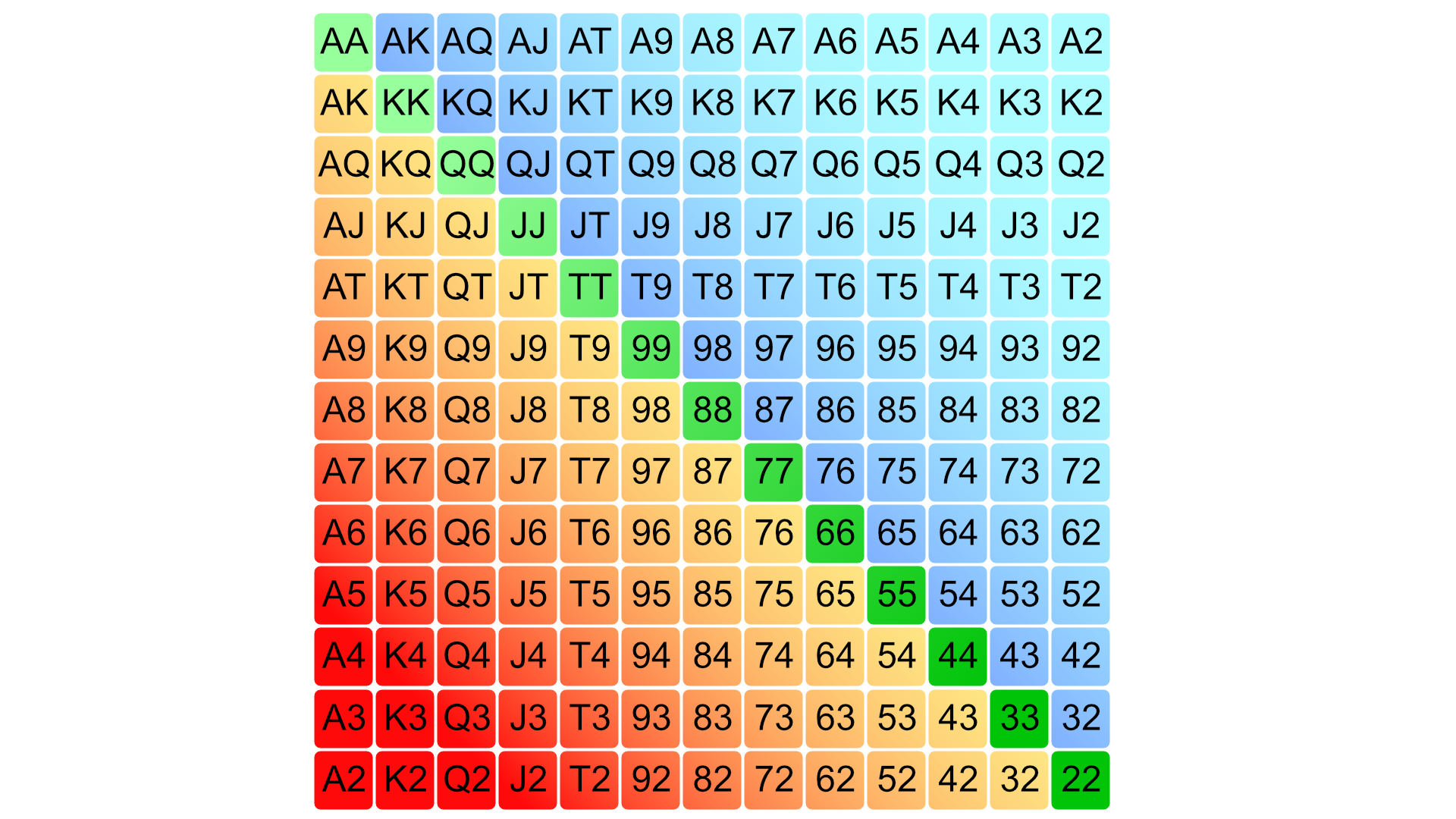
If you’re already somewhat familiar with poker, you’ve definitely seen this 13×13 grid — colored squares showing which hands to open, 3-bet, or call with. This is the range matrix.
The matrix isn’t just a pretty picture. It’s the standard way to display ranges in poker. All solvers, all range tools, and all hand discussions in poker communities use it. Being able to read the matrix quickly and accurately is a fundamental skill — without it, studying strategy becomes slow and inconvenient.
In this guide, we’ll break down the matrix from scratch: what each area means, how colors work, what mixed strategies are, and how to use all of this in practice with FreeBetRange.
Step 1: Understanding the overall structure of the matrix
The matrix is a 13×13 grid. There are 13 rows and 13 columns — one for each card rank: A, K, Q, J, T, 9, 8, 7, 6, 5, 4, 3, 2, from left to right and top to bottom.
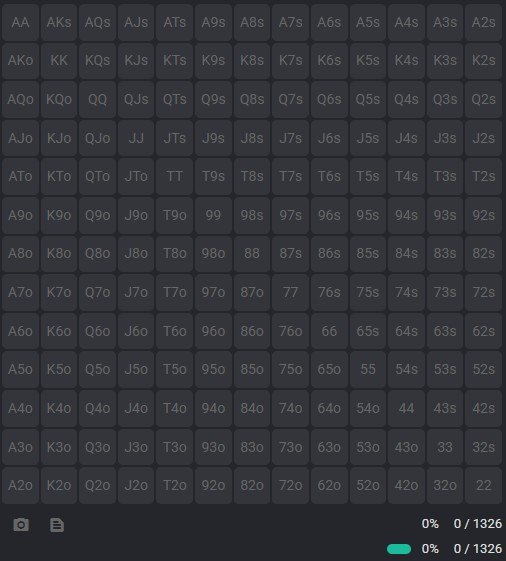
Each cell represents a single hand (a starting hand type). There are 169 unique hand types in total — which is exactly the number of cells in the matrix.
It’s important to understand that these 169 hand types are not equal in terms of the number of actual card combinations. For example, AA can be formed in 6 ways, while AKs only has 4 combinations. We’ll cover this in more detail in Step 2. We also recommend checking out our separate article on poker combinatorics and counting combos.
How to navigate it: think of the matrix like a multiplication table, but instead of numbers, you have card ranks. The intersection of row “A” and column “K” is the hand AK. Whether it’s suited or offsuit depends on where that cell sits in the table.
Step 2: The three zones of the matrix
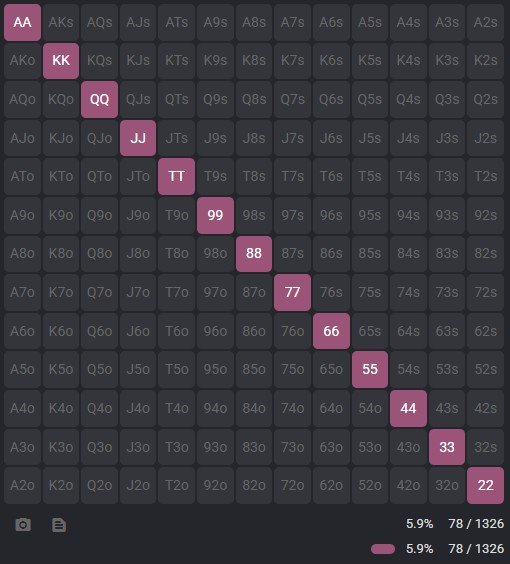
Diagonal — pocket pairs
The main diagonal of the matrix (from the top-left corner to the bottom-right) contains all 13 pocket pairs: AA, KK, QQ, JJ, TT, 99, 88, 77, 66, 55, 44, 33, 22.
The logic is simple: the intersection of row “A” and column “A” is AA. Row “K” and column “K” is KK, and so on.
Each pair has 6 possible combinations (you can choose two cards of the same rank from four suits in 6 ways).
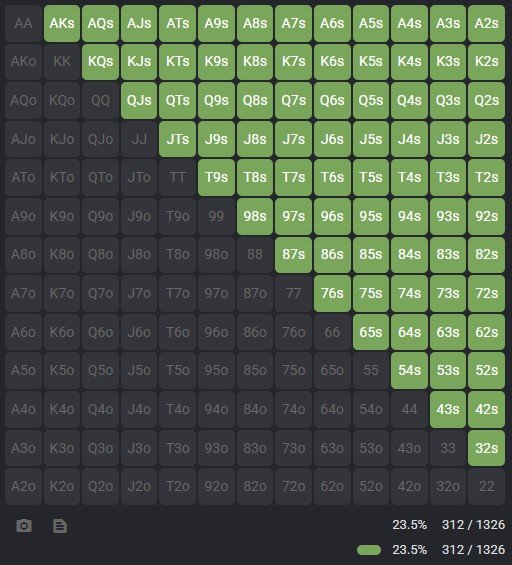
Upper triangle — suited hands
Everything above and to the right of the diagonal represents suited hands. These are marked with the letter s: AKs, QJs, T9s, and so on.
Why are suited hands on top? It’s simply a convention: the row indicates the higher card, and the column indicates the lower card. If the row rank is higher than the column rank, the cell ends up in the upper triangle.
Each suited hand has 4 combinations (one for each suit).
Lower triangle — offsuit hands
Everything below and to the left of the diagonal represents offsuit hands. These are marked with the letter o: AKo, QJo, T9o.
Each offsuit hand type has 12 combinations — three times as many as its suited counterpart. This matters when evaluating the actual “weight” of a range.
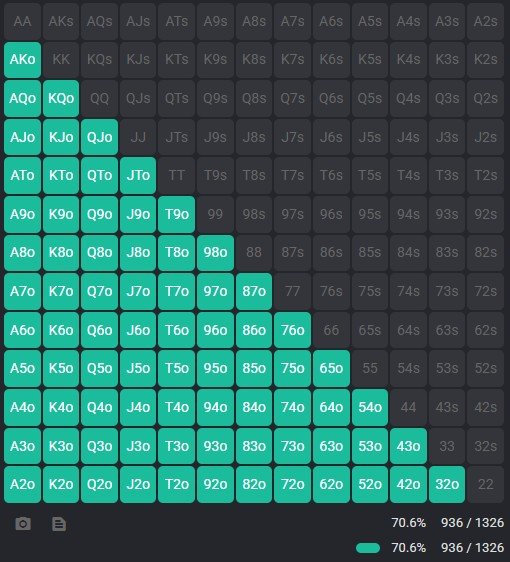
Step 3: Color coding — the core of the range
The colors of the cells represent the strategy. Each color corresponds to an action recommended for that hand in a given situation.
There is no universal color scheme — different tools use different palettes, and that’s completely normal. Before reading any range, always check the legend.
A typical color scheme looks like this:
| Color | Action |
|---|---|
| Red | Raise |
| Green | Call |
| Empty | Fold |
How to read a range as a whole:
- Look at the big picture: what percentage of cells are filled?
- Identify which zones are covered: pairs? suited? offsuit? all three?
- Determine the boundaries of the range: where does the colored area end?
- Check for cells with multiple colors (mixed strategies)
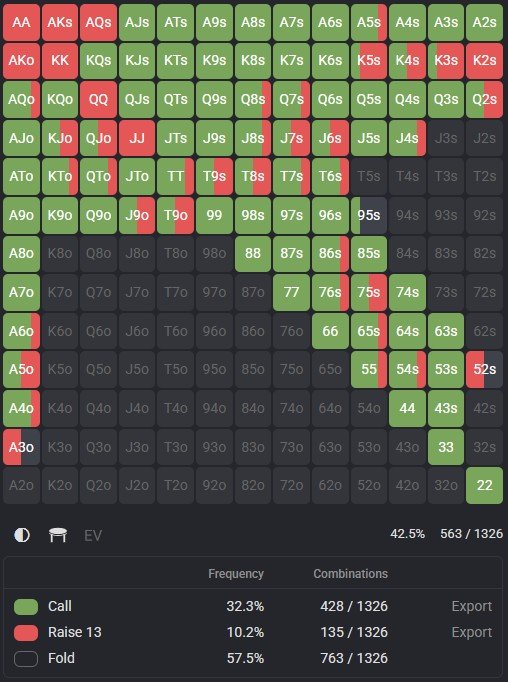
Step 4: Examples of specific ranges
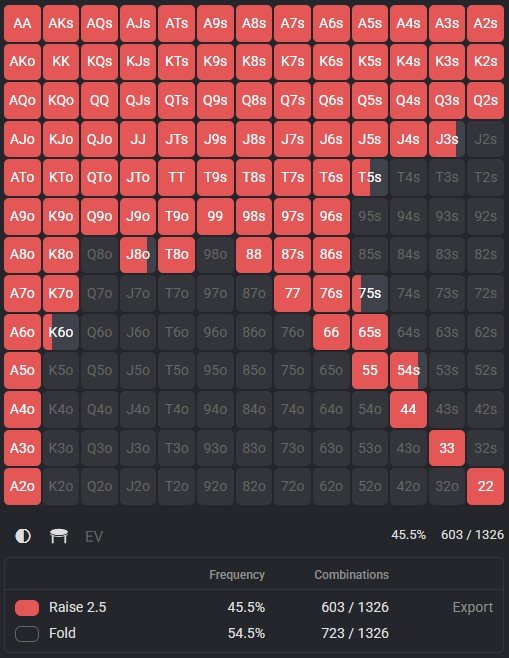
Example 1: BTN opening range (6-max cash)
Opening from the button is a wide range. Here’s what you’ll see on the matrix:
- All pairs (the entire diagonal) — filled
- Suited hands — almost the entire upper triangle, including low suited connectors like 65s and 54s
- Offsuit hands — a significant portion of the lower triangle, but not all of it
Cells with weak offsuit hands (like 72o, 83o) remain uncolored — these are folds.
Example 2: UTG opening range (6-max cash)
UTG is a tight range. On the matrix:
- Pairs — only part of the diagonal: from a certain threshold upward (roughly 55+)
- Suited — only strong suited hands in the top-right corner (AJs+, KQs, and a few others)
- Offsuit — very few: mainly AKo, AQo, and a couple more
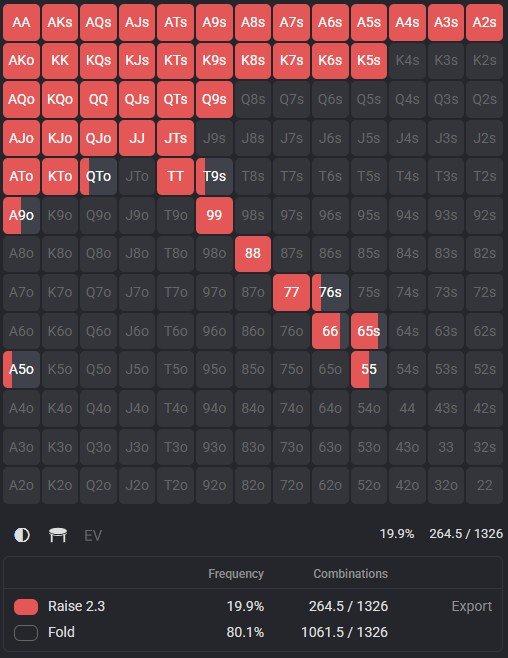
Most of the matrix remains uncolored.
Example 3: BB defense range vs CO open
Here, two colors are used:
- Blue (call) — a wide portion of the range
- Red (3-bet) — selectively, including the best hands and some “trash” hands for polarization
This clearly illustrates a polarized range: top hands (AA, KK, AKs) and some weaker suited hands are used for 3-bets as bluffs, while a large group of medium-strength hands are calls.
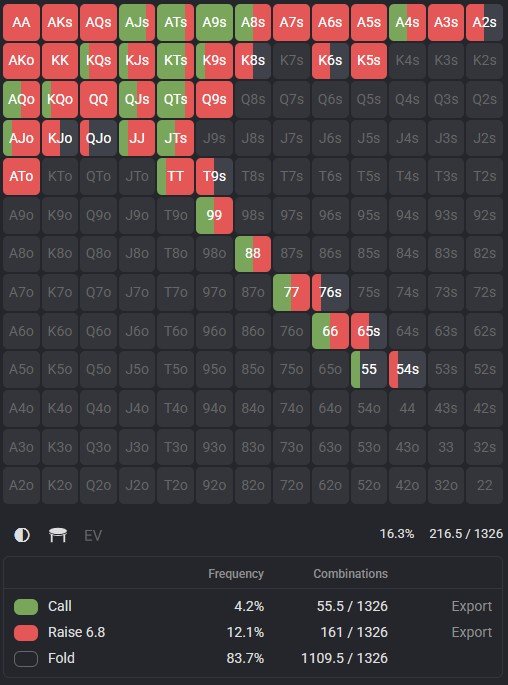
Step 5: Mixed strategies — what they are and whether you should worry about them
In GTO ranges, you’ll notice some cells filled with two colors at once — split evenly or unevenly. This is called a mixed strategy.
What it means: the solver found that two different actions with this hand yield roughly the same EV. So the optimal approach is to take one action some of the time and another the rest of the time. For example, KQs from the SB: 60% raise, 40% call.
Do you need to copy this precisely? At most stakes — no. Mixed strategies matter mainly against strong regulars at higher limits. For mid-stakes and below, it’s usually enough to take the dominant action and use it consistently.
FreeBetRange shows exact frequencies when you hover over a mixed cell — very useful when studying strategy.
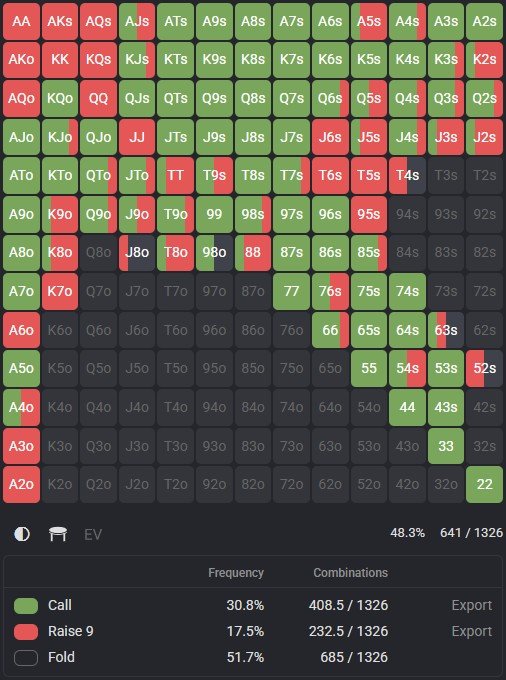
Step 6: Working with the matrix in FreeBetRange
FreeBetRange is a tool where the 13×13 matrix is the central element of the interface. Here’s what it allows you to do:
Range Viewer: view ranges in matrix form with color coding. You can open ready-made ranges from the library or your own.
Multi-Range Viewer: display multiple ranges at once. This is very useful for comparison — for example, how the SB 3-bet range changes depending on who opened.
Editor: create and edit ranges directly in the matrix by clicking and filling in the desired cells.
Trainer: practice ranges. In Range Drawing mode, you recreate a range on the matrix against the clock — one of the best ways to memorize ranges.
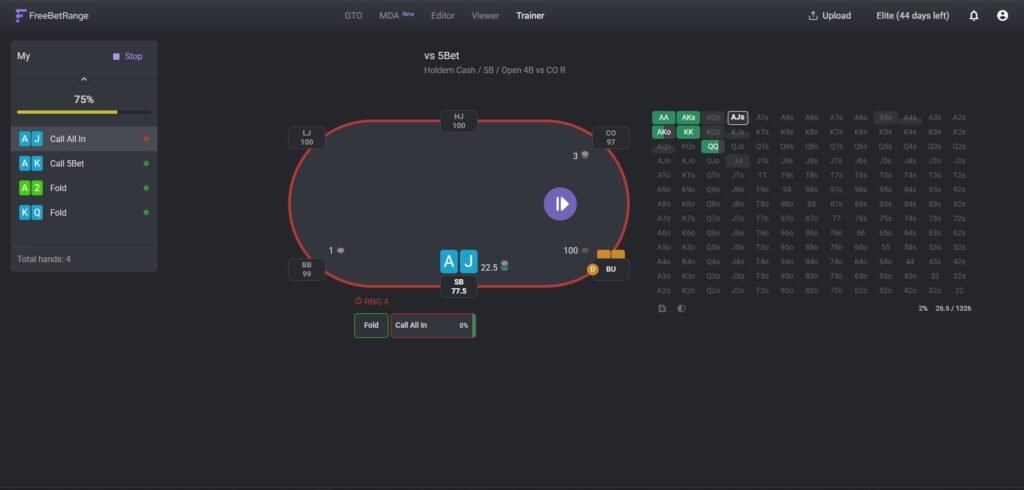
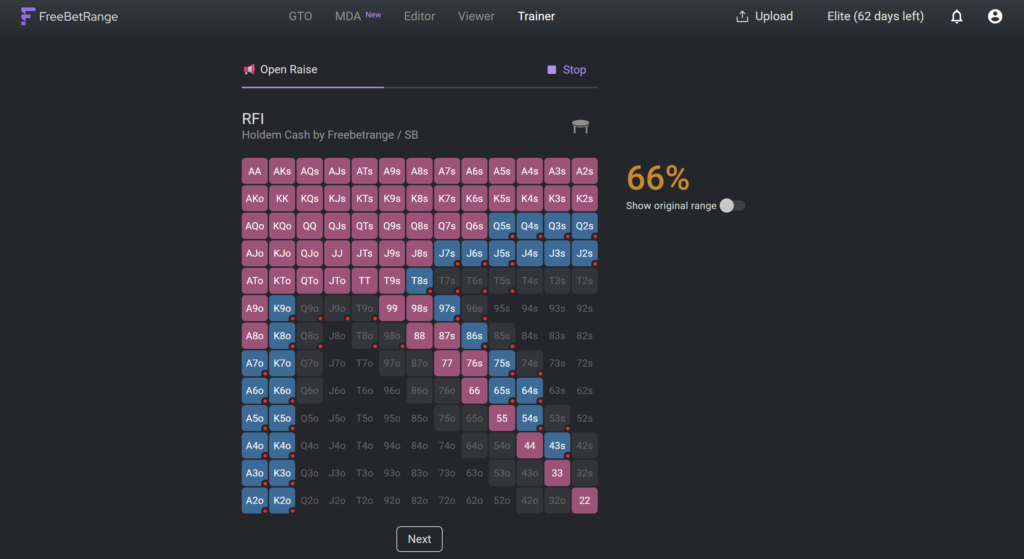
Step-by-step algorithm for reading a range in FreeBetRange
- Open the desired range via the Library, Viewer, or Editor
- Identify the parameters: position, situation, stack size — these are specified in the name
- Find the color legend (usually below or beside the matrix)
- Check the overall range width — the percentage is displayed automatically
- Go through the zones: pairs → suited → offsuit
- Identify the boundary hands: where does the range end?
- Hover over specific cells to see frequencies
FAQ
Why are AKs and AKo in different cells if both contain A and K?
Because they are different hands with different strengths. AKs has extra value due to its ability to make a flush. The matrix reflects this by separating suited and offsuit hands into different triangles.
What does it mean if a cell is half-colored?
It’s a mixed strategy. The hand is played differently at different frequencies. If you’re a beginner, just go with the dominant color.
How can I tell whose range the matrix shows?
Always check the range label. It should specify: position (BTN, CO, BB, etc.), action (open, 3-bet, defend), format (cash/MTT), and stack depth (100bb, 40bb, etc.).
Can I use the matrix to read my opponent’s range?
Yes — that’s exactly what makes the matrix so useful for hand analysis. Knowing your opponent’s position and action, you can find the corresponding range and visually see what hands they may have. This is explained in detail in the article “How to Read Your Opponent’s Preflop Range.”
Conclusion
The 13×13 matrix is the visual language of poker strategy. Once you internalize three simple principles (pairs on the diagonal, suited above, offsuit below) and learn to read the colors, any range from any source will become easy to understand.
FreeBetRange is a convenient starting point for practice: load ready-made ranges from the GTO library, view them in the Viewer, compare them in the Multi-Range Viewer, and train them in the Trainer.

Master GTO preflop strategy, build your own ranges, and train smarter — all in one powerful tool.
Try FreeBetRange