HRC + FreeBetRange: From ICM Calculations to Practical Training
Imagine this situation. You’re playing an online tournament. Three spots left until the money. You have 14 big blinds. The next player shoves all-in. You look down at your hand — Q♠9♠ — and think: “Is this a call or a fold?”
Most players rely on intuition here. Some call, some fold, and both can come up with “logical” explanations. But there is only one correct answer — and it can be calculated with mathematical precision.
That’s exactly what the tools in this article are for. HRC calculates the correct play in any such situation. FreeBetRange helps you memorize it so you don’t have to struggle to recall it at the table. Together, they form a complete training system: from building a strategy to applying it in real play.
What is a range and why it matters
Before we talk about the software, it’s important to understand a key poker concept: no good player makes decisions based only on their exact two cards. Strong players think in terms of ranges — a set of hands you play a certain way in a given situation.
For example: “I’m on the Button. Which hands should I open-raise?” — that’s a question about a range. The answer might look like: “all pairs, all aces from A9 and up, KQ, KJ, KTs, QJs…” and so on. The exact list depends on the format, stack sizes, and many other factors.
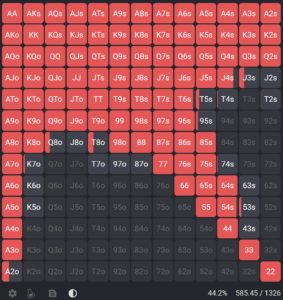
Storing, studying, and memorizing these hand lists is exactly what specialized tools are designed for.
What is HRC (Holdem Resources Calculator)
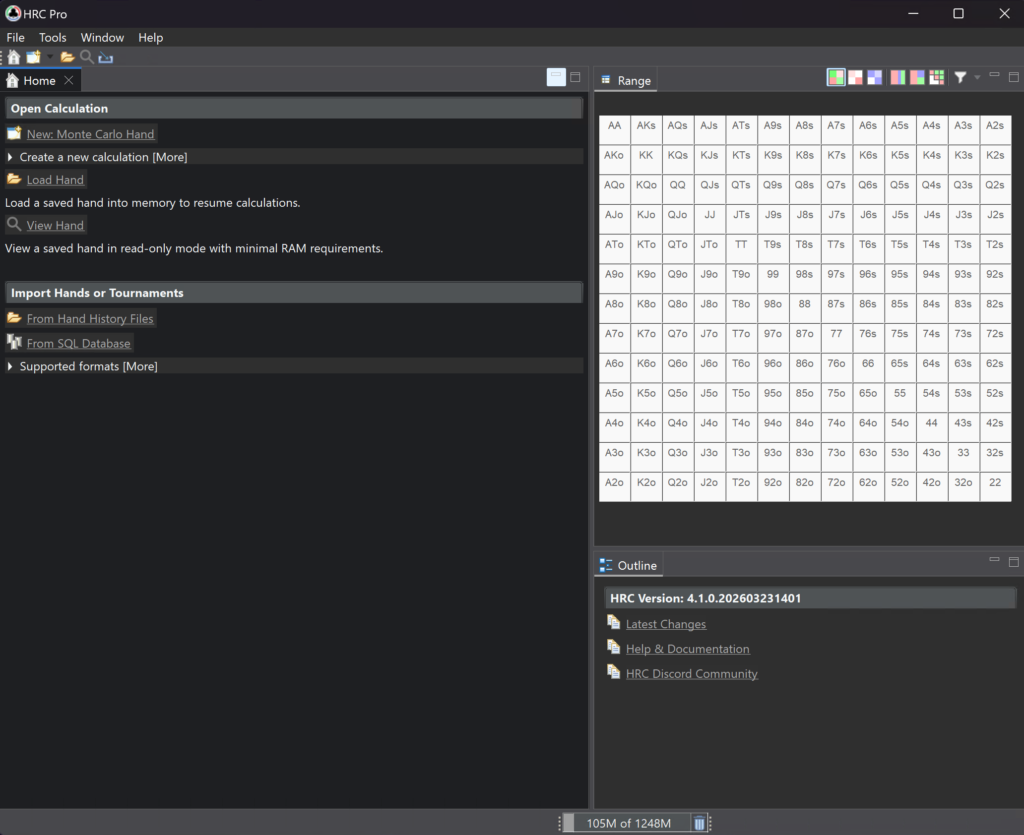
HRC is software you install on your computer. Its main purpose is to calculate mathematically optimal strategies for tournament poker.
Simply put, HRC uses ICM — a model that converts tournament chips into real monetary value, taking into account stack sizes, payouts, and elimination risk. In tournaments, doubling your stack doesn’t double your expected winnings, and losing all your chips can cost much more than gaining the same amount. HRC factors this into optimal range calculations.
What exactly HRC does
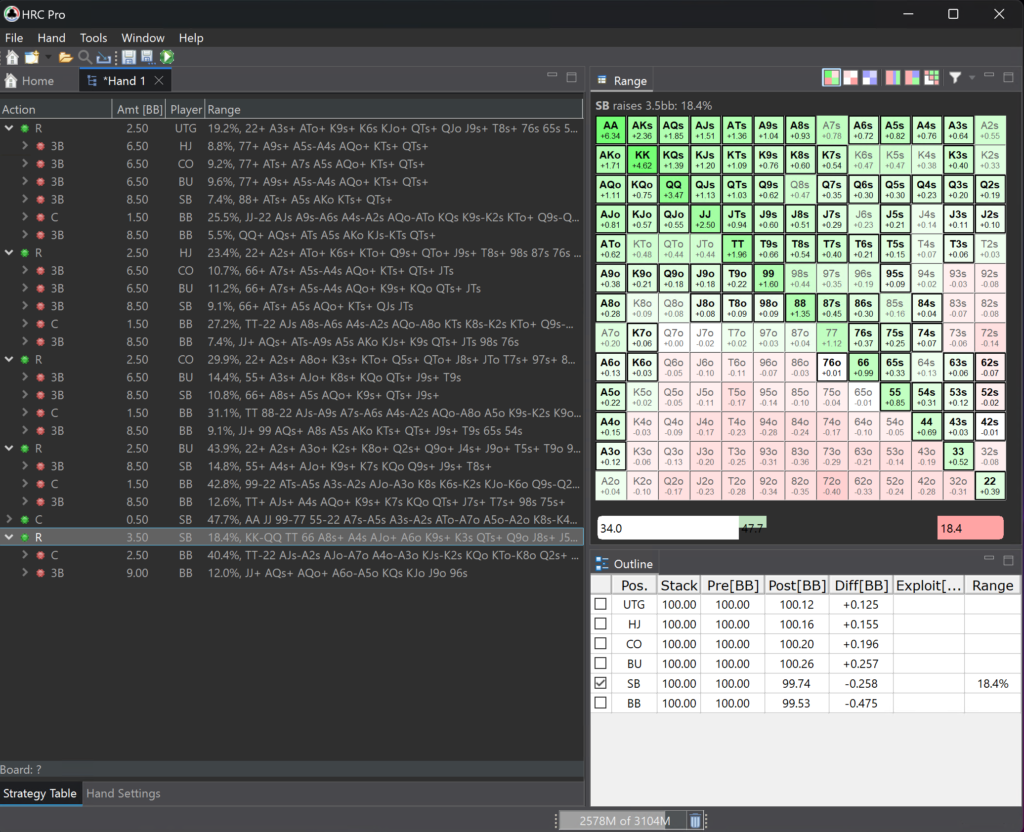
Imagine a situation: you’re at a final table with 15 big blinds, and the next player opens the pot with a raise. What should you do? Jam all-in? Fold? Call? HRC calculates exactly which hands make each option mathematically profitable.
The result is a set of ranges: “these hands go all-in,” “these hands call,” “the rest fold.” All of it is based on the real value of busting versus moving up in payouts.
HRC comes in two versions:
- Classic — suitable for most tournament scenarios. Push/fold, raises, 3-bets, and 4-bets at any stack depth are fully supported. The only limitation is postflop calculations: they are available but simplified for stacks deeper than 25–30 big blinds.
- Pro — a more advanced version for complex scenarios and full postflop analysis without limitations. Ideal if you work with deeper stacks and want maximum accuracy.
The examples below use HRC Pro.
What “Nash equilibrium” means
This is a mathematical concept meaning that no player can improve their result by changing only their own strategy while others play optimally. In simple terms, it’s an “unexploitable” strategy that cannot be beaten in the long run if used correctly.
HRC calculates exactly these Nash ranges.
What is FreeBetRange
FreeBetRange is an online app (runs directly in your browser, no installation needed). Its purpose is completely different: not to calculate strategies, but to help you study and memorize ready-made ranges.
Here’s what you can do in FreeBetRange:
- View ranges in a convenient visual format — a colored 169-hand matrix.
- Compare different situations side by side.
- Train — answer “what should I do with this hand?” just like at a real poker table.
- Create your own ranges — adjust them to fit your playstyle.
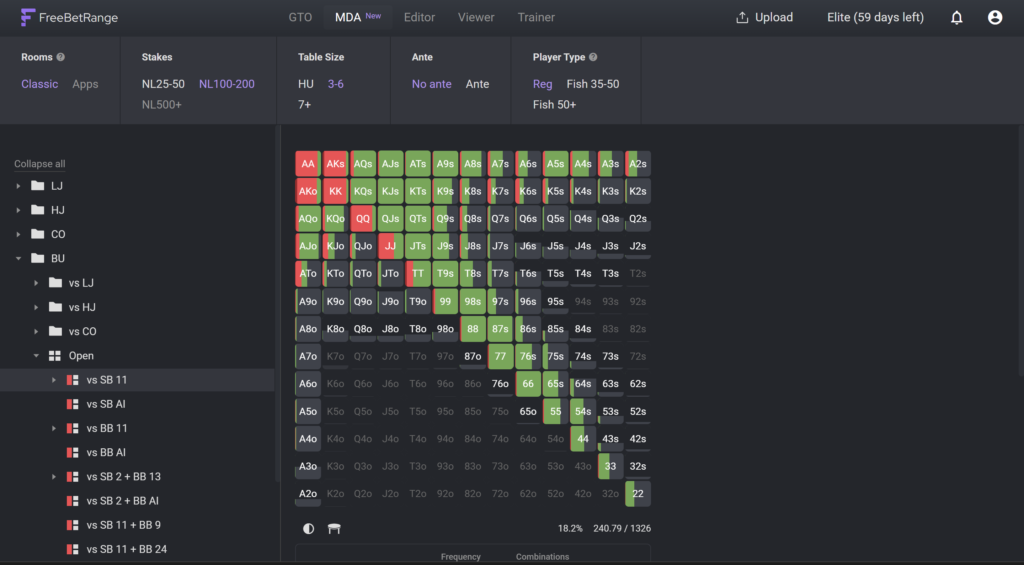
FreeBetRange includes a built-in library of GTO solutions for both cash games and tournaments. But the most powerful feature is that you can upload your own HRC calculations.
The app consists of several sections. Let’s look at the ones relevant for working with HRC outputs:
- GTO Library — ready-made GTO solutions for cash games (NL25, NL100, NL500, different table formats), MTTs, and Spin & Go. Includes both “raw” solutions with precise frequencies and simplified versions with rounded values.
- Viewer — a visual range viewer. This is where you study your strategy after importing.
- Trainer — a training mode where you practice decision-making in a game-like environment.
- Editor — a tool for creating and adjusting your own ranges.
- MDA — a section with population ranges built from analyzing 300+ million real hands. It helps you study player tendencies and build exploitative strategies. Available on the Elite plan.
Why use them together
Here’s the key idea: HRC is great at calculating but not convenient for studying. FreeBetRange is excellent for learning but doesn’t calculate. Together, they form a complete system:
- HRC = “calculate the optimal strategy for my format”
- FreeBetRange = “study and memorize that strategy”
Without FreeBetRange, you’d have to scroll through ranges inside HRC or build spreadsheets in Excel. With FreeBetRange, you upload everything in one file and get a clean visual interface plus a built-in trainer.
How to transfer calculations from HRC to FreeBetRange: step by step
Let’s go through the process in detail. It has two parts: first exporting from HRC, then importing into FreeBetRange.
Part 1: export from HRC
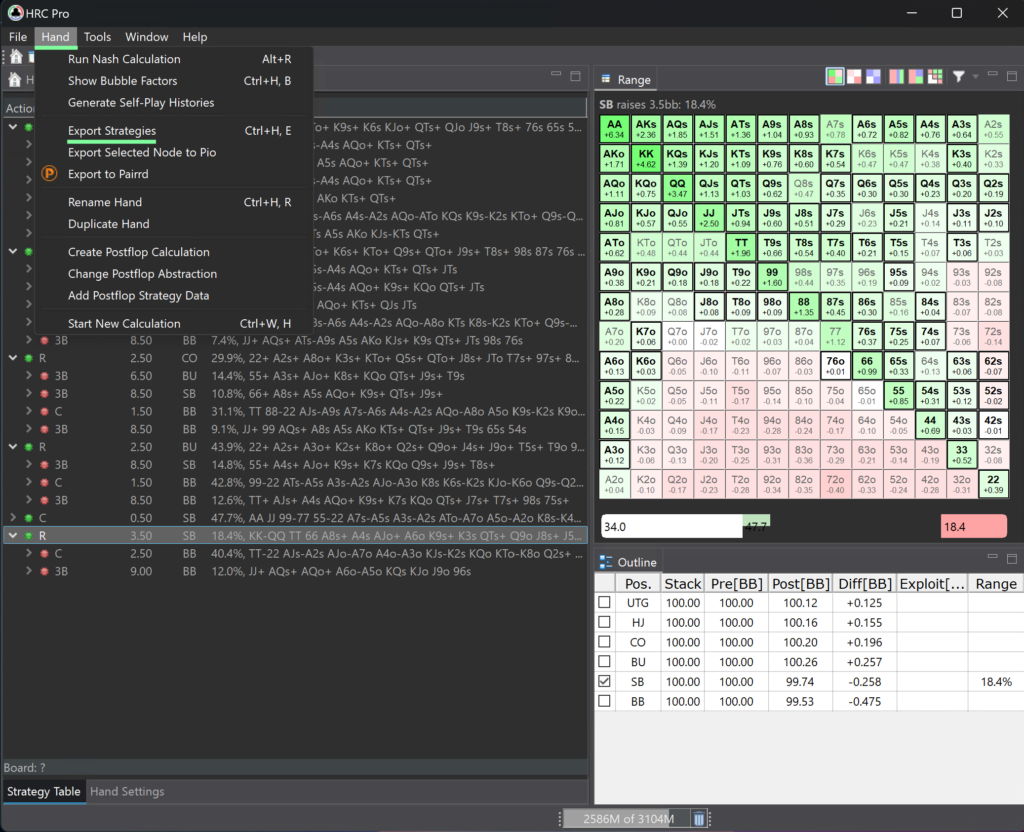
After finishing your calculation in HRC, go to the Hand menu (top of the program) and select Export Strategies.
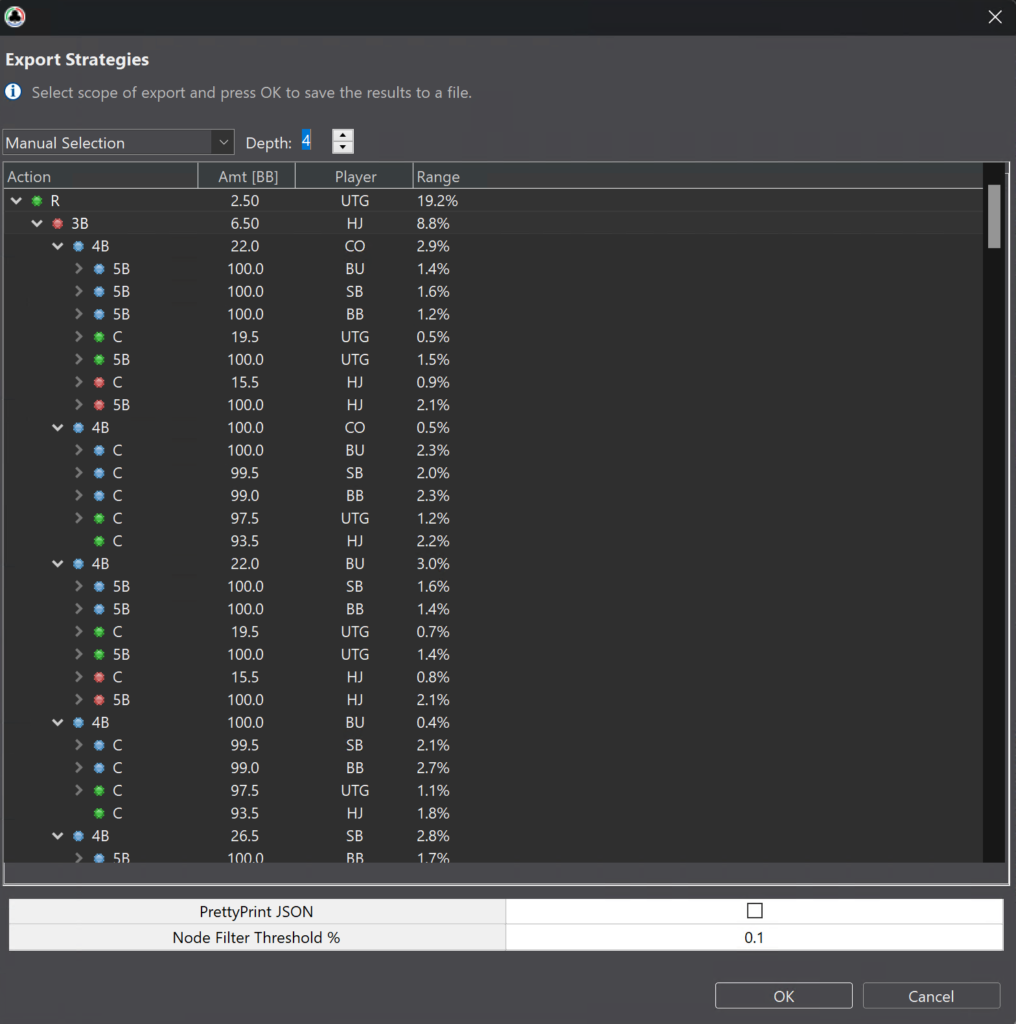
An export settings window will open. Here you can choose:
- Which spots to include — for example, only certain stack sizes or specific actions.
- Depth — how deeply to expand the decision tree.
If you’re unsure, just click OK with default settings — the program will export the full calculation.
The result is a .zip file — an archive containing all your calculated ranges. Make sure you know where it’s saved.
Important: the file must not exceed 100 MB — that’s FreeBetRange’s limit. Tournament calculations usually fit well within this. If your file is larger, go back to HRC and reduce the export depth or select fewer nodes.
Part 2: import into FreeBetRange
The Mass Import from HRC feature is available starting from the Pro plan. Open FreeBetRange in your browser, find the Upload button at the top, and click it. Then select Mass Import from HRC.
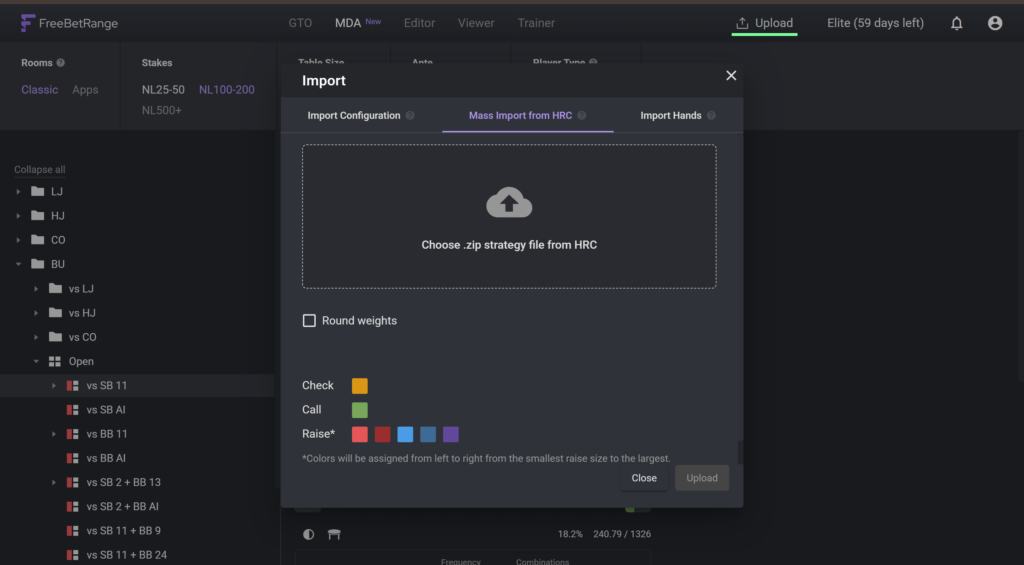
Upload your .zip file. A window with three settings will appear.
Setting 1: Round Weights
This is a very useful option. HRC outputs exact frequencies like “raise 37% of the time.” That’s impossible to execute in real play — you won’t know when it’s the 37% or the 63% case.
Round Weights simplifies all frequencies to the nearest practical value: 0%, 25%, 50%, 75%, or 100%. The strategy remains very close to the original but becomes usable in-game. We recommend enabling this option.
Setting 2: Action colors
Choose which colors represent raise, call, and check. Purely visual — pick whatever feels comfortable.
Click Import — and within seconds all your HRC ranges will appear in FreeBetRange as a folder structure.
We also recommend checking the official guide to importing from HRC.
How to read a range in Viewer
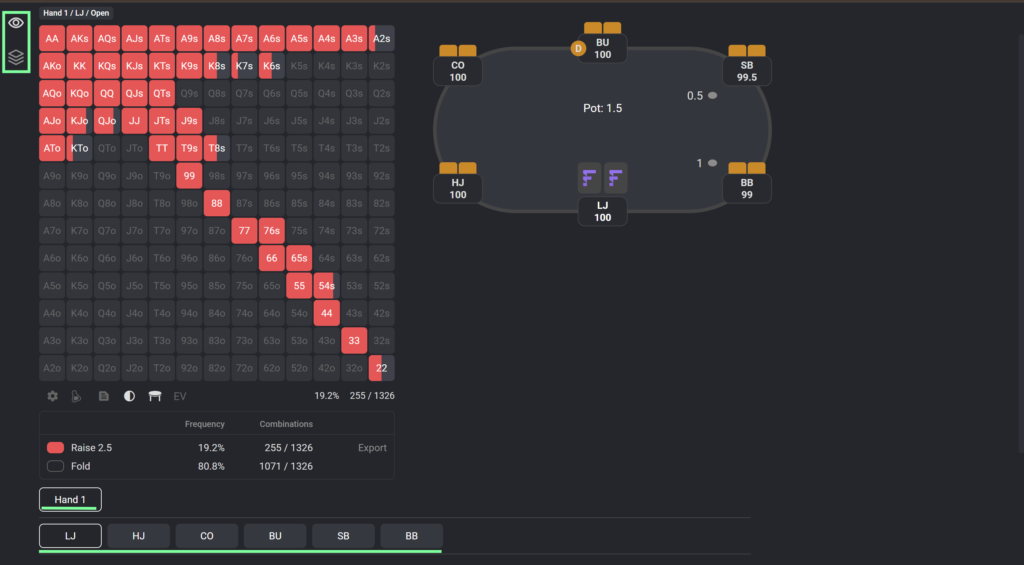
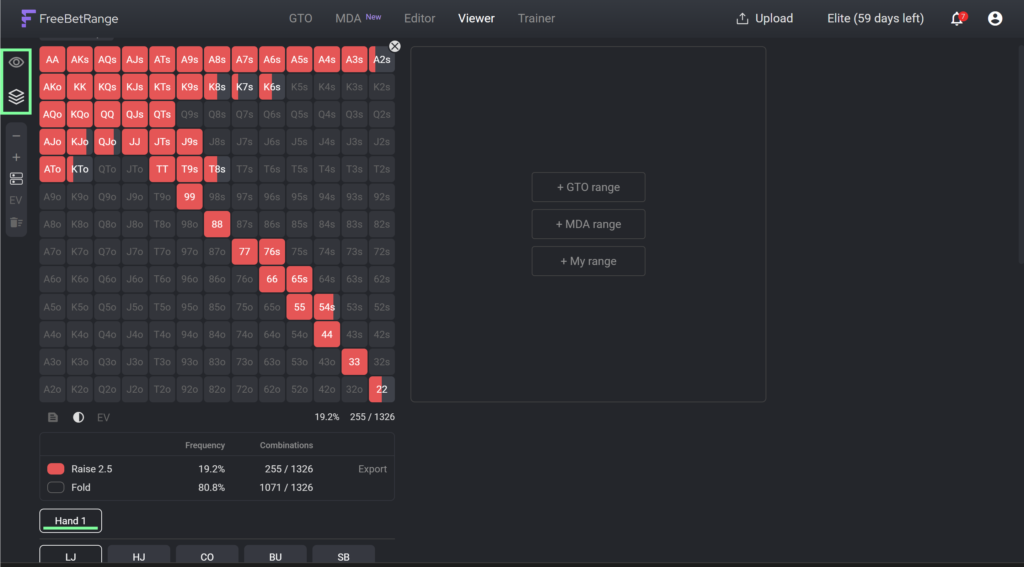
After importing, open the Viewer section. Choose how you want to study the ranges:
- Single Range mode — view one range in the center of the screen,
- Multi Range mode — view multiple ranges on the same screen.
At the bottom, find the folder with your strategy. Click it, then select any spot — the range matrix will appear in the center of the screen.
What is the 13×13 matrix
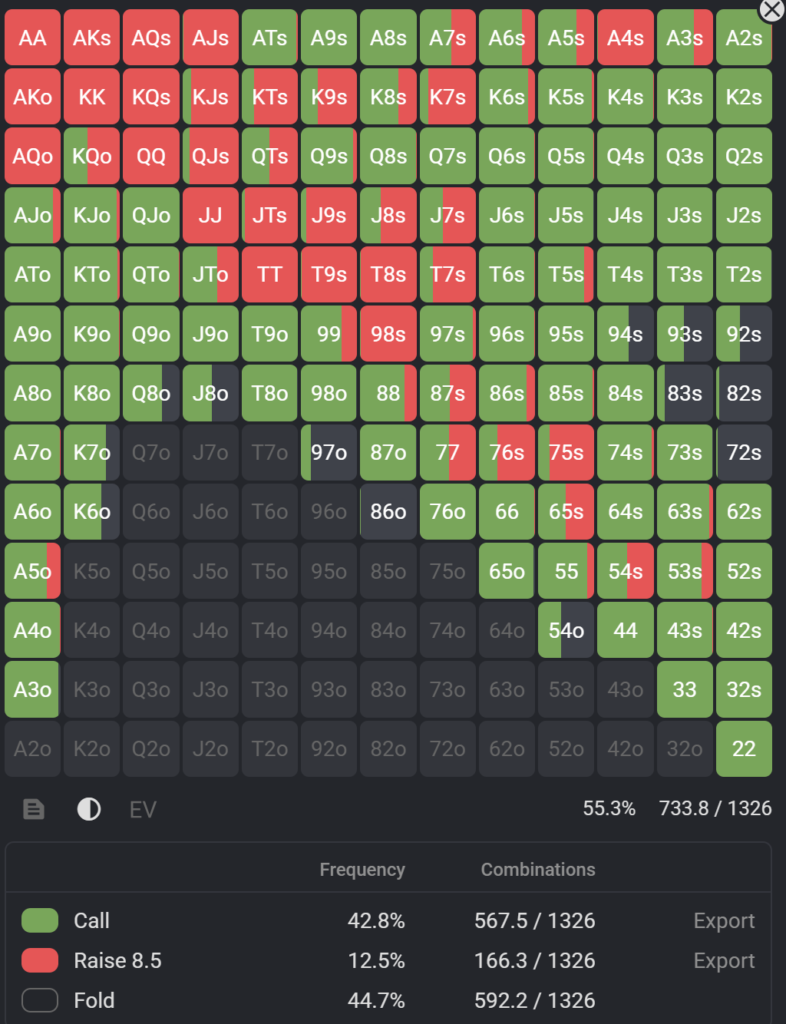
It’s a grid of 169 cells, where each cell represents a specific type of poker hand. For example, “AA” is pocket aces, “AKs” is suited ace-king, and “72o” is offsuit seven-deuce.
The color of each cell shows what to do with that hand:
- One solid color — always take that action (100%).
- Two colors in one cell — take different actions at specific frequencies (mixed strategy).
- White or gray — fold.
How to switch between situations
To the right or below the matrix, you’ll find navigation buttons for the decision tree. Clicking them moves you from one spot to another — for example, from an opening range to the response against it.
EV matrix: “why this works”
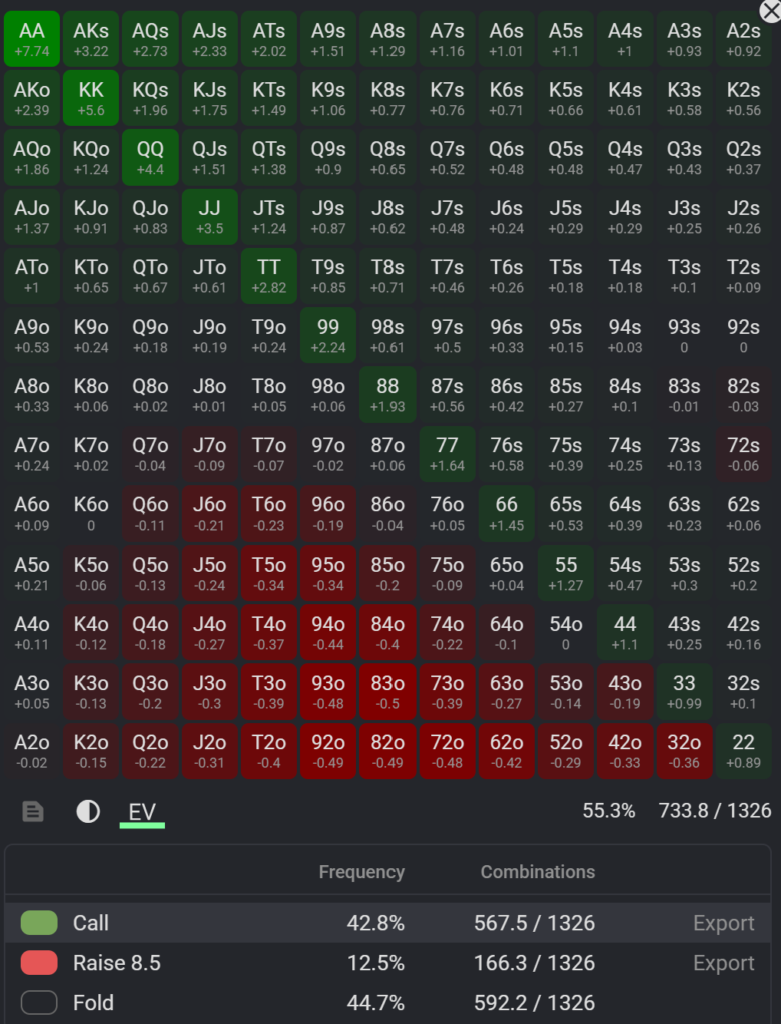
Click the EV icon below the matrix to see numbers instead of colors. These are the expected values (EV) of each hand in that spot. Positive means profitable; near zero or negative means marginal or losing.
This helps you understand the logic behind the range — why A9s is included while A8o is not.
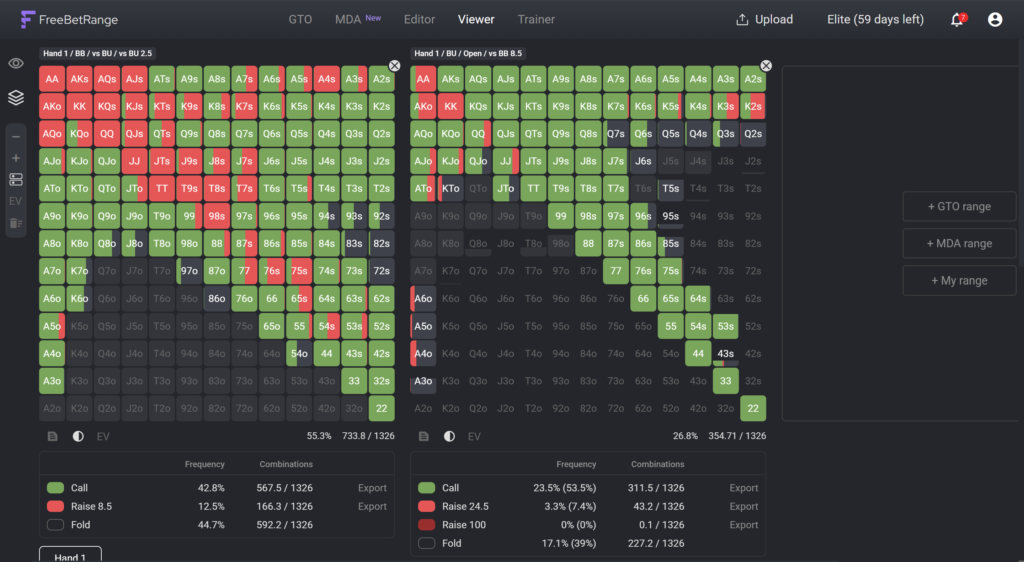
Comparing multiple situations side by side
Switch to Multi-range mode to open several matrices at once. This is useful, for example, to compare how your push range changes from 10bb to 15bb to 20bb. Open all three side by side and see the differences clearly.
Random number generator
On the Pro plan and higher, Viewer includes a random number generator (0–100) below the matrix. It updates automatically when you switch ranges. Use it for mixed strategies (e.g., “raise 75%”): if the number is 0–74, raise; if it’s 75–99, call.
How to train in Trainer
Simply viewing ranges in Viewer is helpful, but real learning comes from practice. That’s what the Trainer section in FreeBetRange is for.
On the free plan, Trainer is limited to 50 hands and 5 ranges per day. On the Pro plan and above — no limits.
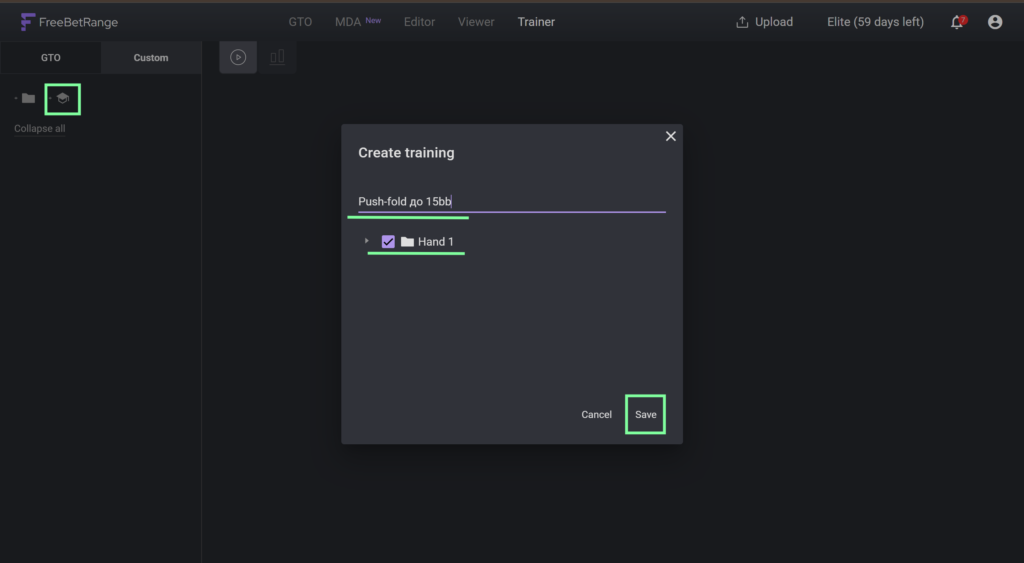
Creating a training exercise
Click Custom >> Add training. Enter a name — for example, “Push/fold up to 15bb.” Select the ranges you want to train (from your HRC folder). Click Save.
You can include up to 500 ranges in one exercise. You can also reorder exercises by dragging them.
Classic mode — like at a real table
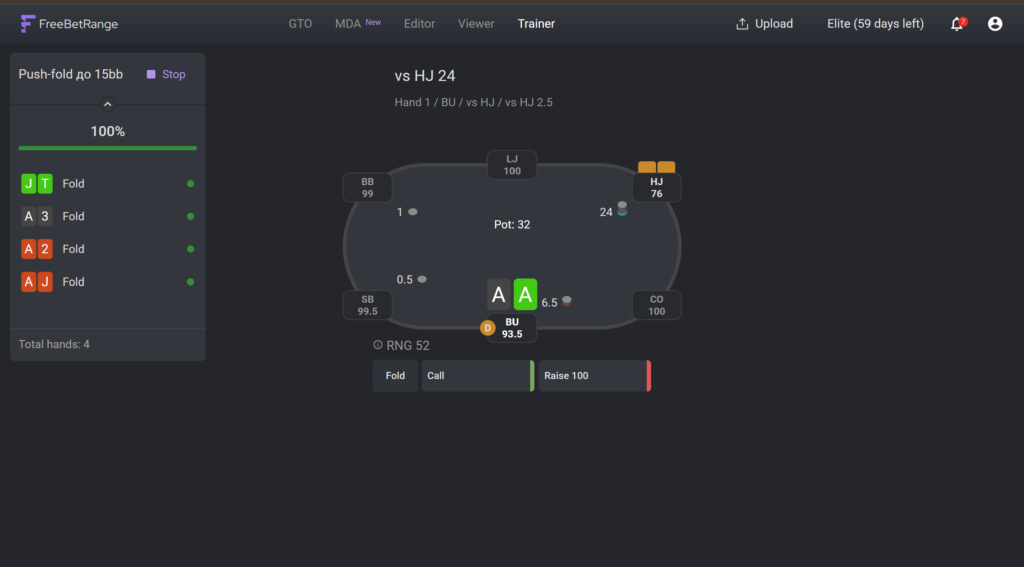
Start the exercise. You’ll see a poker table with player positions and your hand. Choose the correct action — Fold, Call, or Raise.
If your answer is correct, the table highlights green and you move to the next hand immediately. If not, it turns red and pauses — showing you the correct answer.
A useful setting is Hands dealing coverage: you can specify which hands the system deals to you. This helps avoid wasting time on obvious folds and focus on tricky combos. By default, the system selects hands from the range plus borderline hands around it.
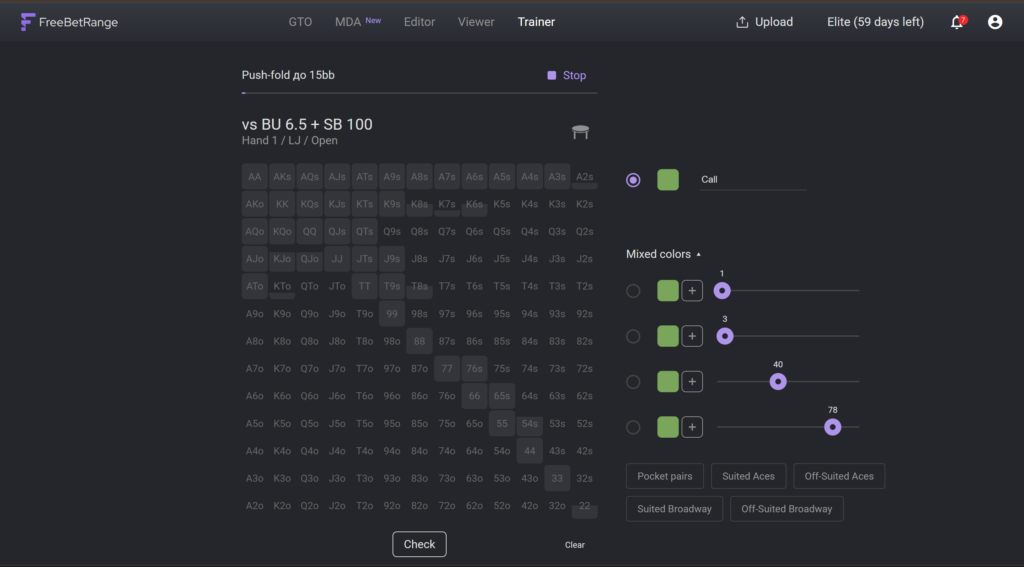
Range mode — draw ranges from memory
In this mode, you get an empty 13×13 matrix. Your task is to mark which hands take which actions. Then the system compares your version with the correct one and highlights mistakes.
This is harder than Classic mode but more effective for long-term retention — you think in full ranges rather than individual hands.
Tracking your progress
After each session, check the exercise stats. There are two tabs: Classic stats and Range stats — showing history and accuracy for each mode.
The Statistics tab is the most useful for analysis. It’s a 13×13 matrix where each cell is colored based on your accuracy: green means you’re doing well with that hand, red means consistent mistakes.
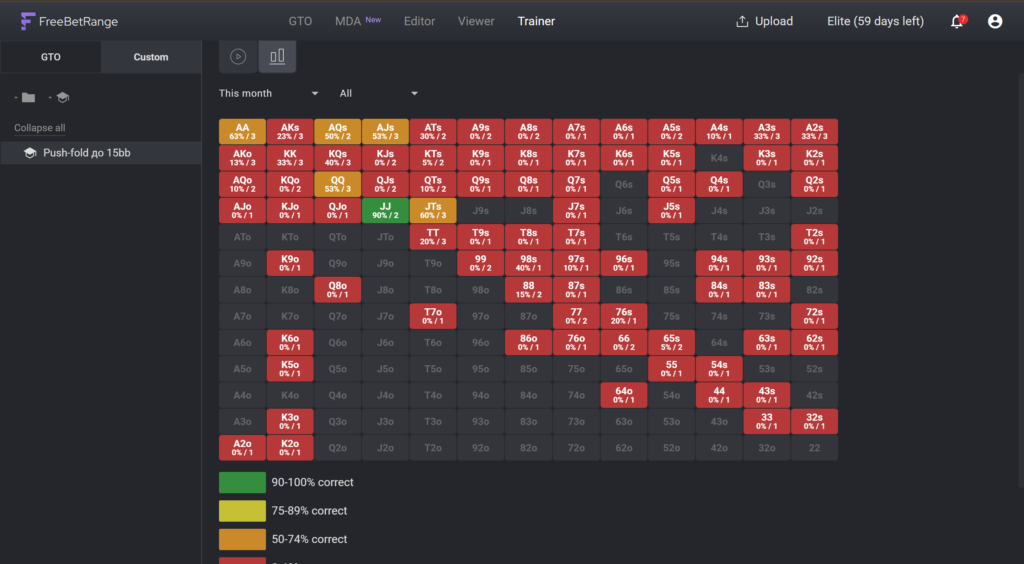
Focus your next training sessions on the red cells. No guesswork — just data.
Where to start if you’re new
If you’re just getting into GTO and tournament poker, here’s a good approach:
Start with FreeBetRange without HRC. It has a built-in library of GTO ranges — begin there. Explore the GTO Library and practice in Trainer with the basic exercises available right after registration.
Learn basic push/fold ranges. This is the foundation of MTT poker: which hands to shove with short stacks and which hands to call against a shove. FreeBetRange lets you train this immediately.
Once you understand what’s missing, install HRC, learn how to calculate ranges for your specific formats, and import them into FreeBetRange.
Gradually move to more advanced spots: 3-bet and 4-bet situations, blind defense, and ranges under specific ICM pressure near the bubble.
Summary: the key points in one minute
- HRC — software for calculating mathematically optimal ranges in tournament poker (including ICM and Nash equilibrium).
- FreeBetRange — a browser-based app for studying and training ranges.
- Importing from HRC to FreeBetRange — done via Upload → Mass Import from HRC. Upload a
.zipfile from HRC and the full decision tree appears in a convenient format. Available on the Pro plan and above. - Round Weights — simplifies solver frequencies to practical values (0/25/50/75/100%) for real play. Enable it after uploading your ranges.
- Viewer — visually study ranges. Multi-range mode lets you compare multiple spots side by side.
- Trainer — practice and memorize through gameplay. Classic mode = decisions at the table; Range mode = reconstruct ranges from memory.
- Statistics — identify which hands you struggle with most.
Together, this forms a system that turns mathematical calculations into real skills at the poker table.

Master GTO preflop strategy, build your own ranges, and train smarter — all in one powerful tool.
Try FreeBetRange